Renting a parking spot by the month: how a monthly spot works
Short answer
- A monthly spot in AntPark is a running agreement between you and the owner of the spot. You send a request, and the owner always approves it personally.
- The rent is paid ahead of each month. If you have saved a card, it is charged seven days before the month begins; otherwise you pay yourself in the app by then.
- The notice period is 30 days and the same for both. Days you do not need can be released for a credit.
What a monthly spot is
Anyone looking for monthly parking (månadsparkering) usually wants the same spot every day, near home or work, without booking again. In AntPark this is called a monthly spot: a running agreement for a parking spot, month by month, with no minimum term.
You rent the spot from the person who owns it. AntPark is a marketplace that arranges the booking and the payment and takes a service fee for it. The agreement for the spot itself is therefore between you and the owner, who rents it out as a private individual.
The spot is yours during the listing’s opening hours, every week. If the owner is open around the clock every day, the spot is yours all the time. If the owner is open on weekdays 7–18, those are the hours you rent. The app shows which hours apply before you send the request.
Finding a spot to rent by the month
AntPark is new and operates in Sweden, and there are still few spots to rent. You can see for yourself what is available where you are looking: open antpark.app in your browser and look at the map. The Android app is on Google Play. The iPhone app is not in the App Store yet.
- Turn on the Monthly filter. The map and the list then show the spots that are rented out by the month, with the price per month.
- Read the listing. It shows the type of spot, the largest car in length and height, the opening hours and reviews from other renters. If you add your car, the listing tells you whether it fits.
- Choose Month and a start date. You see which hours of the week the spot will be yours, the monthly rent, the service fee and the total per month.
If there is no free spot in the area, you can ask the app to tell you when something opens up there. The watch lasts for at most 30 days.
Until you have a spot, the map shows it inside a circle, at most 180 metres from its centre. You get the exact address once the owner has approved the agreement.
The request and the owner’s approval
A monthly spot cannot be booked instantly. You send a request, and the owner says yes or no. That applies to every monthly spot, also with owners who otherwise accept instant bookings.
- Before you can send a request, you need to have verified your mobile number with a code by text message.
- Nothing is reserved or charged when you send the request. The first month is charged only once the owner has approved.
- The owner has 24 hours. If there is no answer, the request expires, and the app tells you so.
- With the request you choose whether the monthly rent is to be charged automatically to a card that you save, or whether you want to pay each month yourself.
If the owner says yes, the agreement runs from the start date. You get a notification, and the monthly spot is then listed under Bookings in the app.
How the monthly rent is paid
The rent is paid ahead of each month, and only for the days of the month that the agreement covers. If the agreement starts in the middle of a month, you pay for the rest of that month, not for all of it.
- With a saved card, the next month is charged automatically seven days before it begins. You are told when the money has been charged.
- Without a saved card, you pay yourself under Payments due in the app, at the latest seven days before the month begins. You get a notification fourteen days before the month begins, and another if the last day has passed.
- If the month is not paid in time, it does not start, and the agreement ends seven days after the last day for payment.
- If the month has already begun when the owner approves the agreement, it is charged the same day.
On top of the monthly rent comes AntPark’s 10% service fee, at least SEK 5 per payment. The fee is shown separately in the price breakdown. The payment is handled by Stripe, and AntPark never sees your card number. Receipts for each month are in the app.
When the spot is yours
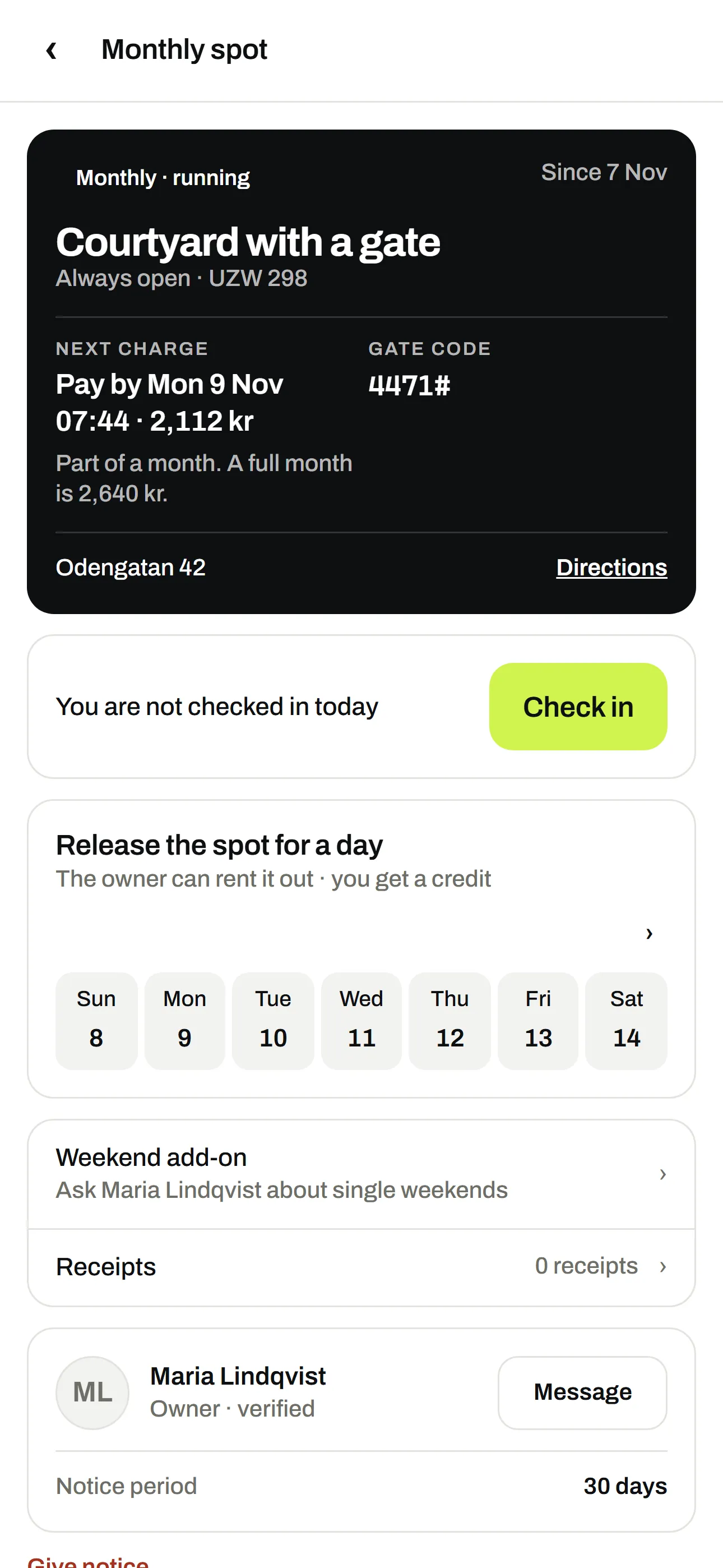
- The address and the gate code. The street address is shown from the moment the owner has approved the agreement. The gate code is shown in the app on the days the spot is yours.
- Contact with the owner. The agreement has its own thread in the app where you write to each other. Neither of you sees the other’s phone number.
- Release days you do not need. If you are away, you can release one day or several days in a row. The owner can then rent out the spot to someone else, and the days are deducted from your rent.
- The next charge. The monthly spot shows when the next month is charged and how much, with the credit for released days included.
You are responsible for making sure that the car fits within the dimensions in the listing, that you park there only during the hours that are yours, and that you follow the owner’s rules and the signs at the spot.
Notice and ending the agreement
You give notice for the monthly spot in the app. The notice period is 30 days from the day you give notice, and it is the same for the owner as for you.
- The spot stays yours for the rest of the notice period and then ends. Notice cannot be undone.
- If you have already paid for days after the last day of the agreement, they are deducted from the next payment or refunded.
- If the owner gives notice, the same 30 days apply, and you get a notification.
- If the owner pauses the listing, your agreement still applies. An owner cannot remove a listing that has a running monthly agreement.
- If the owner loses the right to rent out the spot, you are not to pay for time that cannot be used. What has already been paid for such time is refunded through AntPark’s support.
If something does not work, write to the owner in the thread first. If that does not solve it, you can reach support at support@antpark.app. The details are in the terms and under support and FAQ.
By the month, or by the hour and day?
The same spot can often be rented in several ways. The differences in AntPark:
| By the hour or day | By the month | |
|---|---|---|
| How you book | Instant booking or a request, depending on what the owner has chosen | Always a request that the owner approves |
| Payment | The amount is reserved when you book and charged when the booking begins | Ahead of each month, seven days before it begins |
| Ending it | Free cancellation up to 2, 12 or 24 hours before the start, according to the listing’s rule | 30 days’ notice, the same for both |
| Suits | Visits, single working days and events | Commuters and residents who need the same spot every week |
If you are looking for a garage, read the guide to renting a garage spot. For a boat there is the guide to renting a boat berth and winter storage. If you have a spot of your own that stands empty for part of the week, the guide to renting out parking describes how to rent it out.
Frequently asked questions
How long is the notice period for a monthly spot?
30 days from the day you give notice, and it is the same for you and for the owner. You give notice in the app. The spot stays yours for the rest of the notice period.
What does a monthly spot cost?
The monthly rent set by the owner, plus AntPark’s 10% service fee, at least SEK 5 per payment. The full amount per month is shown before you send the request.
Do I have to save a card to rent by the month?
No. If you save a card, the monthly rent is charged automatically seven days before each month begins. Otherwise you pay each month yourself in the app, at the latest seven days before it begins.
What happens if the owner does not answer my request?
The request expires after 24 hours. Nothing has been charged, and you can send a new request or choose another spot.
Can I pause the monthly spot while I am away?
You cannot pause the agreement, but you can release single days back to the owner. Those days are deducted from the rent.
Am I renting the spot from AntPark?
No. You rent from the owner, who is a private individual. AntPark arranges the booking and the payment and takes a service fee for it. Read more in the terms.
Sources
The rules were checked against the sources below on 6 November 2026.