Parking queue and guest parking in a housing association
Short answer
- Members join the queue with their flat number. When a spot becomes free, the board offers it in queue order, and the member answers in the app.
- The fee stays on the monthly bill (avi) as it is today, never through AntPark. Each month you download a file with the month’s agreements for the property manager.
- The guest spots are only visible to members, who book them themselves free of charge. The board sees who has booked and when.
What the board decides first
A parking queue in a Swedish housing association (bostadsrättsförening) usually lives in a binder or a spreadsheet, and guest parking on a note in the stairwell. AntPark keeps track of the queue, the spots, the agreements and the bookings. The rules are still the association’s, so decide them before you start:
- Who may join the queue, and whether anyone is to have priority.
- What a spot costs per month, and what applies when a flat is sold.
- How the guest spots may be used: by whom, for how long and how often.
- Who on the board handles the queue, and whether the property manager is to have access of their own.
Some rules are built into the app, and you need to know them:
- The queue is ordered by queue date.
- A flat can get one spot through the queue.
- An agreement is ended with 30 days’ notice, by the member or by the association.
- An offer has a time to answer that the board chooses, from one to thirty days.
If they do not match your statutes or decisions, say so when we go through how you do things today. AntPark for associations is available to associations in Sweden.
How the queue works
- The member joins the association in the app, with a code that the board hands out, for example on the notice board.
- The member joins the queue with their flat number, and then sees their place in the queue in the app.
- The board offers a free spot to a member in the queue, with a start date, a monthly fee and a time to answer. The queue is shown in order, and whoever is next in line is marked.
- The member gets a notification and answers yes or no in the app within the time to answer.
- A yes becomes an agreement from the start date, and the member leaves the queue. A no, an offer that expires and one that the board withdraws leave the member in the queue with their queue date.
This is also good to know:
- The queue you already have comes with you. The board can set the queue date for a member, though not in the future.
- The app shows the order but does not enforce it. The association’s rules may give priority, so it is the board that chooses who the offer goes to.
- A member has one offer at a time, and a spot can only be offered to one member at a time.
- To answer an offer, the member needs to have verified their mobile number in the app.
- A flat that already has a spot through the queue gets no new offer.
- A member who leaves the queue loses their place in it. Anyone who joins again ends up last. The board can also remove a member from the queue.
Members’ spots and the agreements
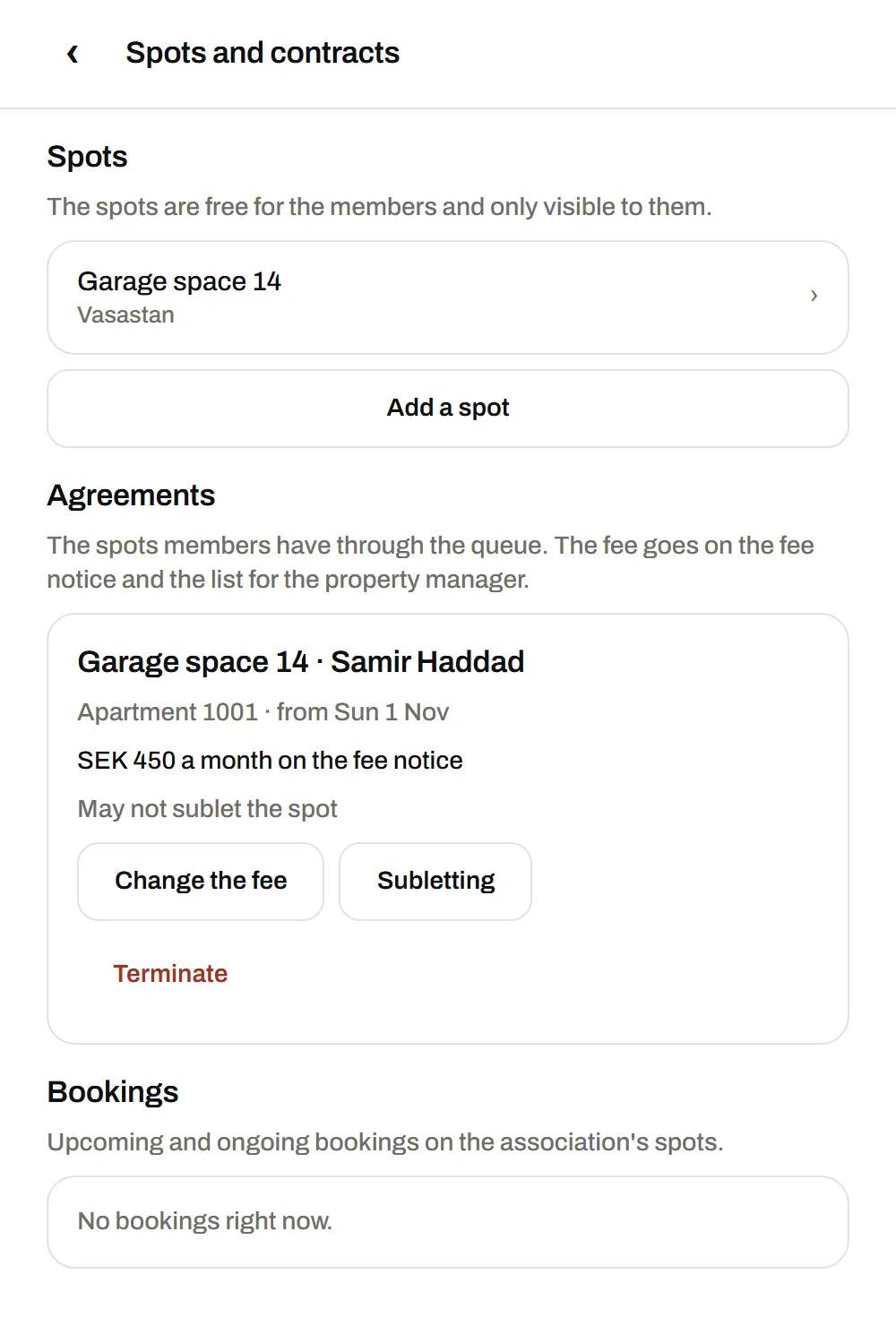
Every spot that goes through the queue becomes an agreement with flat, start date and fee. The member sees their spot in the app as a monthly spot with the association as the other party. It shows the fee that goes on the monthly bill, and the gate code appears when the spot starts.
- Changing the fee. The board can change the fee on an agreement.
- Terminating. The association can terminate an agreement. It then runs thirty more days, and the member is told. The member can give notice for their spot in the app with the same notice period.
- Moving out. A member who has a spot through the association cannot leave the association in the app until the agreement has been terminated and has ended. Nor can the board remove the member before then.
- The spots. The board adds the garage and parking spots and can pause a spot, for example during a renovation.
Guest parking
The board adds the guest spots as the association’s spots. They are only visible to the association’s members and cost nothing to book.
- The member books in the app, instantly and without anyone having to approve, for a few hours or a whole day. The guest does not need an account.
- The board sees the bookings: who has booked, which spot and when, in the spot’s calendar and in the list of upcoming and ongoing bookings.
- The board can cancel a booking that has not started, and the member is then told. The board can end a booking that is ongoing.
- The rules are yours. The app has no setting today that limits how long or how often a member books a guest spot. Write the rules into the house rules and follow them up in the list of bookings.
What the board sees and can download
The board runs the association in the browser, on the association’s page in AntPark. The page has the sections The queue for spots, Spots and contracts, Members and codes, Money and reports, and The public page. Three files can be downloaded:
| File | Contents | Intended for |
|---|---|---|
| List for the property manager | The month’s agreements per flat: the flat, the member, the spot, the fee per month and the first and last day of the agreement | The financial manager, who adds the fee to the monthly bill |
| The basis for the board | The month’s bookings on the association’s spots: who, which spot, when and for how long. No amounts | The board’s follow-up, and a basis if the association charges for guest parking at its own rate |
| The queue as a file | The queue as it stands today, in order, with flat, name and queue date | The association’s own records, and if the association wants to take the queue elsewhere |
The list for the property manager does not recalculate the fee for part of a month. How a month that has begun is billed is the association’s rule.
Members’ names are shown to the association’s administrators and managers, but not to other members. Phone numbers and email addresses are never shown.
Roles, codes and members
- Three roles. The administrator, for example the board, can do everything. The manager sees the members and handles the spots, the queue and the agreements. The member is the resident. The association always has at least one administrator.
- Codes. A code for members can be used by many and is valid for one to 365 days. A code for a manager or an administrator works once. A code can be revoked.
- You hand out the codes yourselves, for example on the notice board or in a mailing. The app does not send invitations by email.
- The public page. The board can show a page with the association’s name and a presentation that anyone with the address can read. It can say how to become a member and whom to contact.
- In the apps and on the web. Members join, queue, answer offers and book in the app or in the browser. The board’s part is in the browser.
Money and cost
- The members’ fees do not go through AntPark. The fee is part of the agreement and the list for the property manager, and is paid on the monthly bill as it is today.
- The association’s cost. The pilot is free. After that, the association pays a fee per spot and month, by invoice. The size of the fee has not been set yet.
- VAT on the association’s parking is a matter for the association and its property manager. The Swedish Tax Agency’s position on parking that an association rents out to its residents is mentioned under VAT in the guide to renting out parking.
Getting started
- Register your interest on the page for housing associations. This does not create an account.
- We get in touch and go through how you do things today. We are the ones who set up the association. An association cannot be registered on its own.
- The board adds the spots and creates a code for the members.
- Members join and join the queue, and you enter the queue dates from the queue you have.
More about what the association gets is on AntPark for housing associations. If you have an office with spots of its own, there is also the guide to staff parking for companies and the page AntPark for companies. A resident who wants to rent out their own spot to others needs the association’s consent. That is described in the guide to renting out parking.
Frequently asked questions
Do the members’ parking fees go through AntPark?
No. The fee is part of the agreement and the list for the property manager, and is paid on the monthly bill as it is today. Nothing is charged in the app.
Can we bring the queue we already have?
Yes. The board can set the queue date for each member, so that the order from a paper queue or a spreadsheet comes with you. The queue date cannot be set in the future.
What happens when a member declines a spot?
The member stays in the queue with their queue date. The same applies if the offer expires without an answer or is withdrawn by the board. The spot can then be offered to the next person in the queue.
Can guests book the guest parking themselves?
No. The association’s spots are only visible to members, so it is the member who books the guest spot in their app. The guest does not need an account.
Can we limit how long a guest spot may be booked?
The app has no setting for that today. The board sees every booking with the member’s name and can cancel a booking that has not started, so the rules for guest parking are the association’s own to set and follow up.
What does it cost the association?
The pilot is free. After that, the association pays a fee per spot and month, by invoice. The size of the fee has not been set yet.
Sources
The rules were checked against the sources below on 6 November 2026.